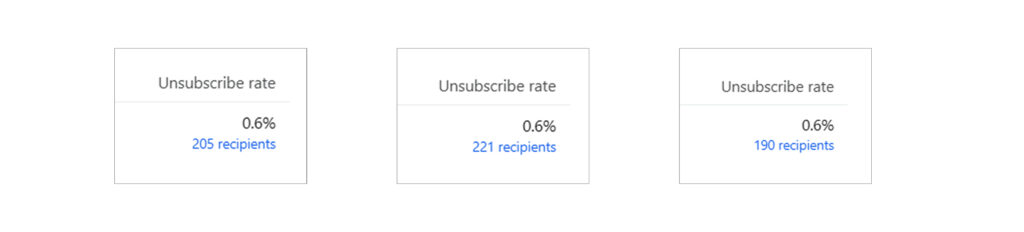
Losing 0.5%-0.6% of your email list per campaign might not sound like a problem. But if you send emails consistently, that small number compounds fast. At that rate, you’ll lose around half of your entire list in less than a year.
And once subscribers leave, they’re gone for good.
The issue isn’t usually your offers or your brand. Most unsubscribes happen because people feel overwhelmed by how often they hear from you not because they don’t want your emails at all.
In this post, you’ll learn how to reduce unsubscribes by changing how people exit your list. With a few small adjustments inside Klaviyo, you can keep more subscribers, protect long-term revenue, and continue sending campaigns at the same pace.
Why Unsubscribes Matter
Your email list is like a bucket.
Every time someone joins, you add water.
Every time someone unsubscribes, water leaks out.
If the leaks are big, your bucket never fills up.
High unsubscribes can lead to:
- A smaller email list over time
- Less sales from email
- More money spent on ads to replace lost subscribers
So even if your emails are making sales today, unsubscribes can hurt you later.
How to Reduce Unsubscribes Step by Step
The main idea is simple:
Before you let people unsubscribe, offer them fewer emails.
We’ll set up 3 things:
- A better email footer
- A better unsubscribe page
- A better preference page
Then we’ll make a segment so you send fewer emails to the right people.
Step 1: Update Your Email Footer
Most people unsubscribe from the bottom of your email.
They scroll down, find the unsubscribe link, and click it.
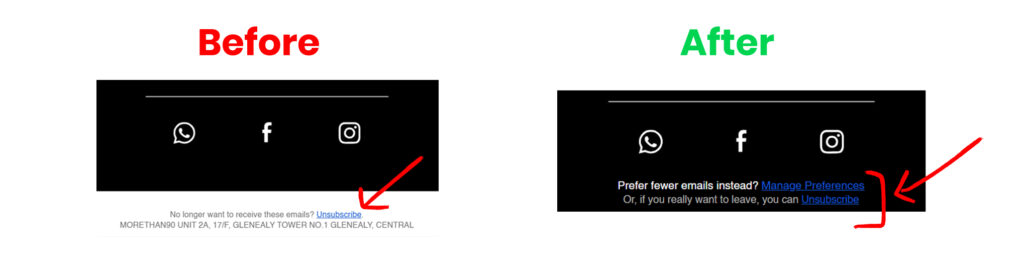
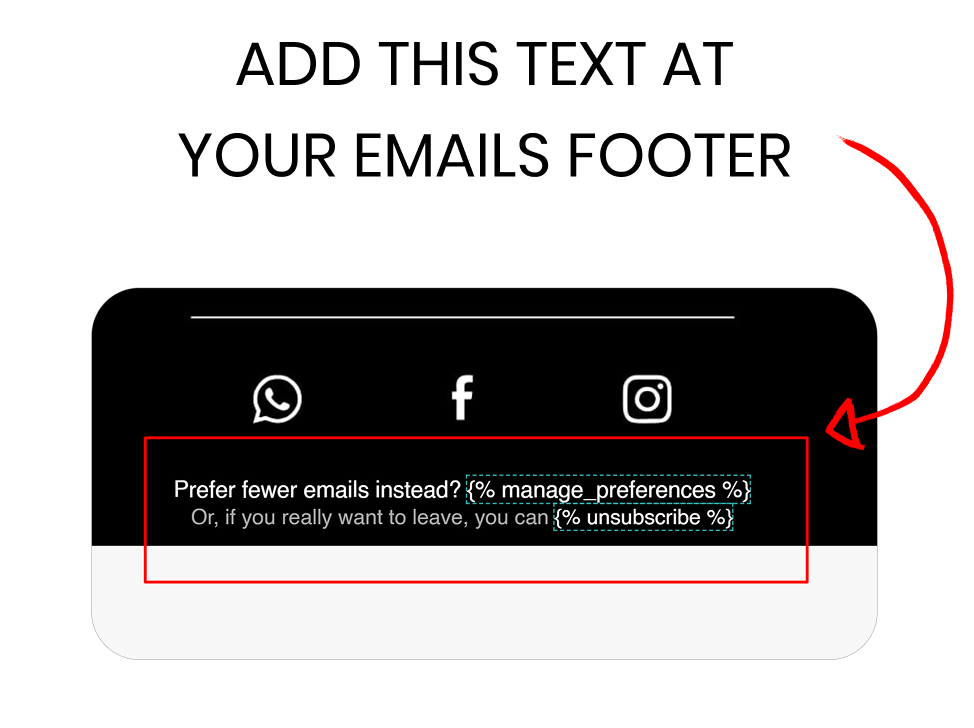
So we’re going to add a line that says:
- “Want fewer emails?”
- “Update your preferences”
This gives them a choice besides leaving.
In your footer, put the “fewer emails” link above the unsubscribe link.
And make sure to remove the old unsubscribe link.
That’s it.
Step 2: Fix Your Unsubscribe Page
Next, we’ll change what happens when someone clicks unsubscribe.
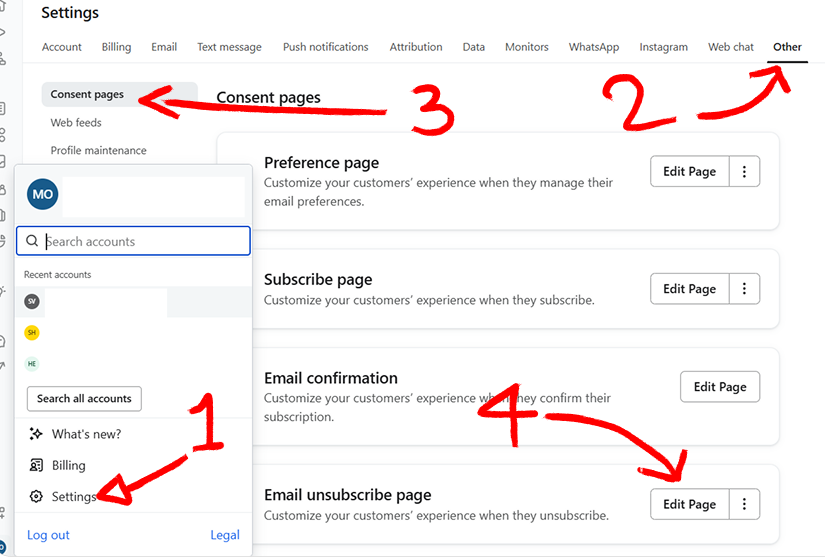
Go to:
Klaviyo → Settings → Consent Pages → Unsubscribe Page
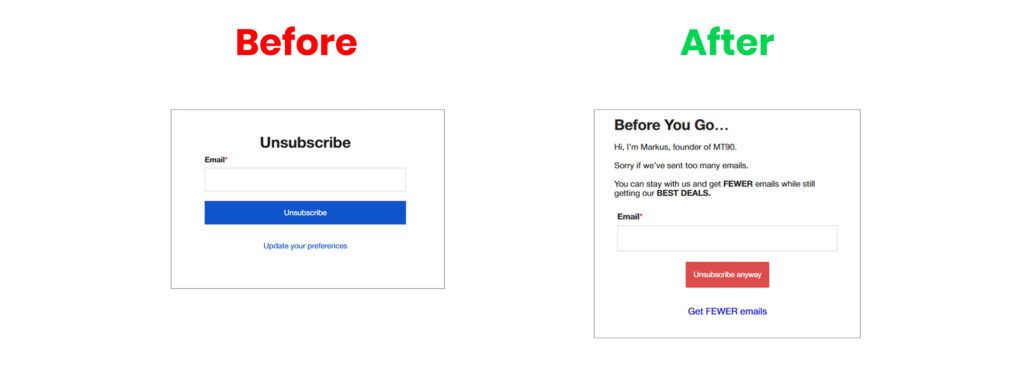
By default, this page makes it way too easy to leave.
Instead, your page should say something like:
- “Sorry if we emailed too much.”
- “Want fewer emails instead?”
Then give them two clear choices:
- ✅ Get fewer emails
- ❌ Unsubscribe anyway
Make the “Get fewer emails” option the main button.
Step 3: Fix Your Preference Page
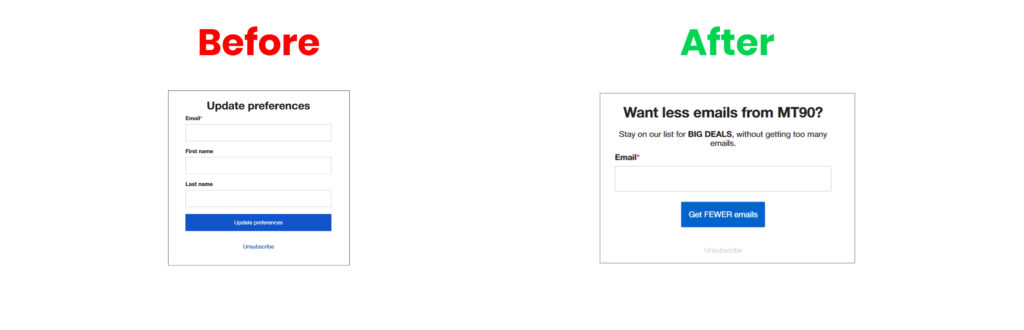
Now we need a place where people can choose “fewer emails.”
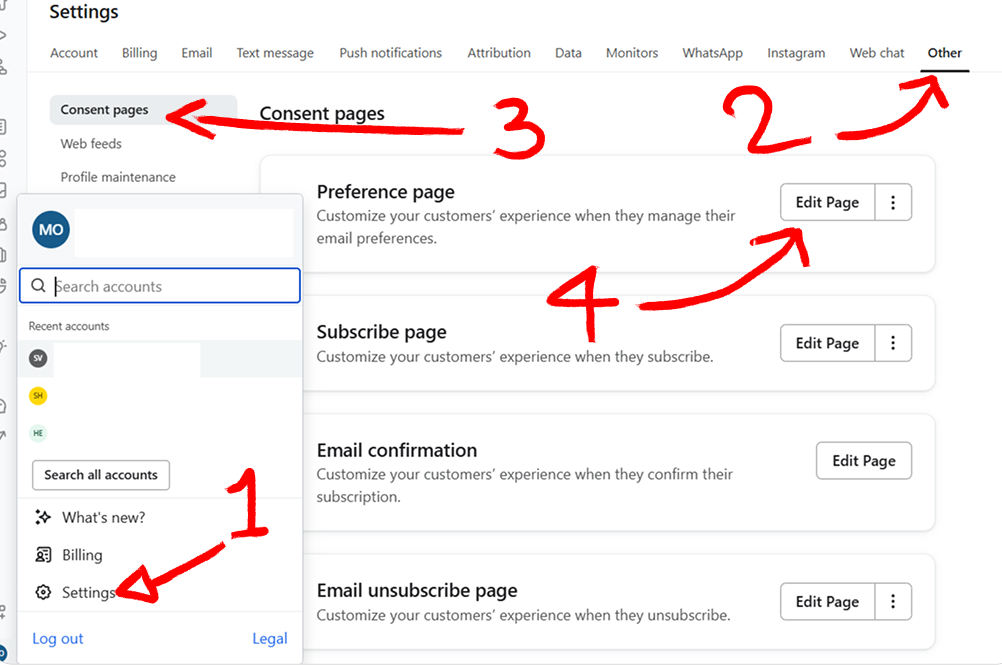
Go to:
Klaviyo → Settings → Consent Pages → Preference Page
This page should be simple.
Make it feel like:
“Stay on the list, but we’ll email you less.”
Keep the text short and clear.
Remove anything extra that makes it feel complicated.
Step 4: Create a “Fewer Emails” Segment
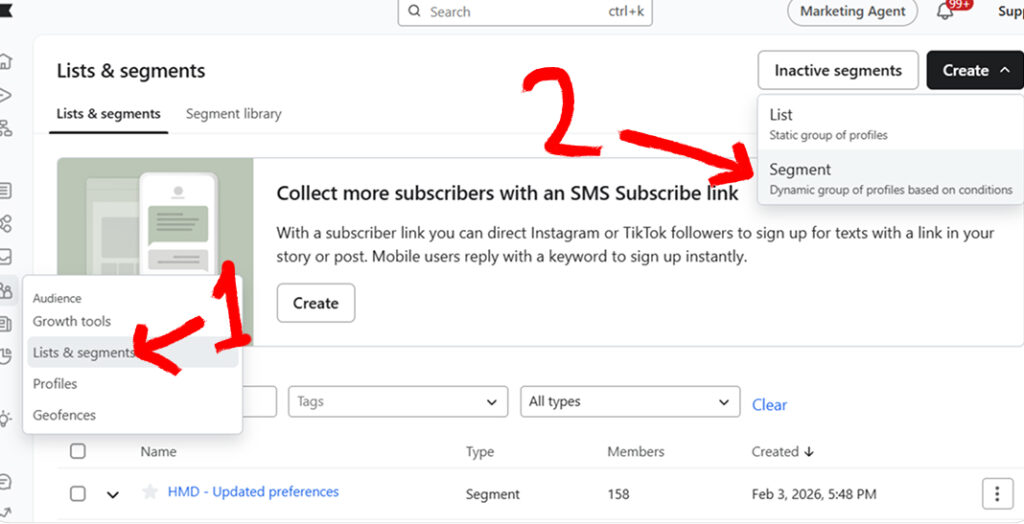
Now we need to track who asked for fewer emails.
Go to:
Audience → Lists & Segments → Create Segment
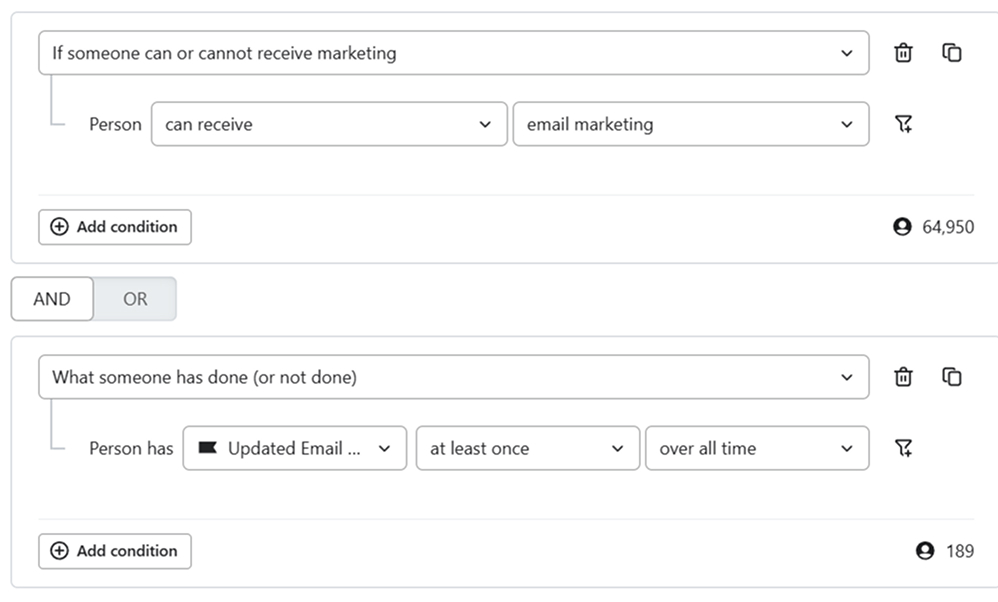
Create a segment for people who:
- Can receive email marketing
- AND have updated email preferences at least once
This is your “fewer emails” group.
Step 5: Stop Sending Them Every Campaign
This step is very important.
If someone asks for fewer emails, and you keep sending them everything…
they will unsubscribe anyway.
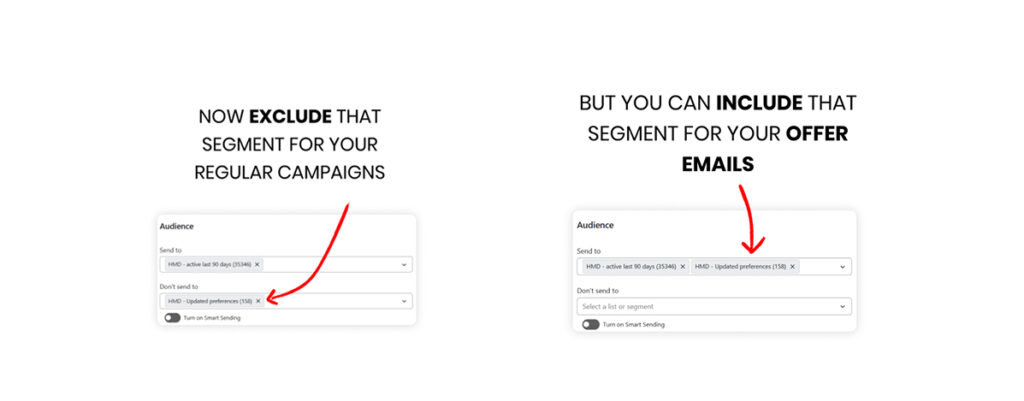
So do this:
- Exclude the “fewer emails” segment from regular campaigns
- Only include them in big emails like:
- Sales
- Big promos
- Black Friday / BFCM
- Special product drops
This keeps them happy and keeps them on your list.
Why This Works
Most people don’t want to leave forever.
They just want a break.
When you offer “fewer emails,” you:
- keep more subscribers
- avoid list shrink
- lower spam complaints
- protect your sales long-term
And once you set it up, it keeps working in the background.
Want to watch the full tutorial?
I have recorded a full video tutorial on how to do all the steps, You can click on this LINK and watch my tutorial in youtube.
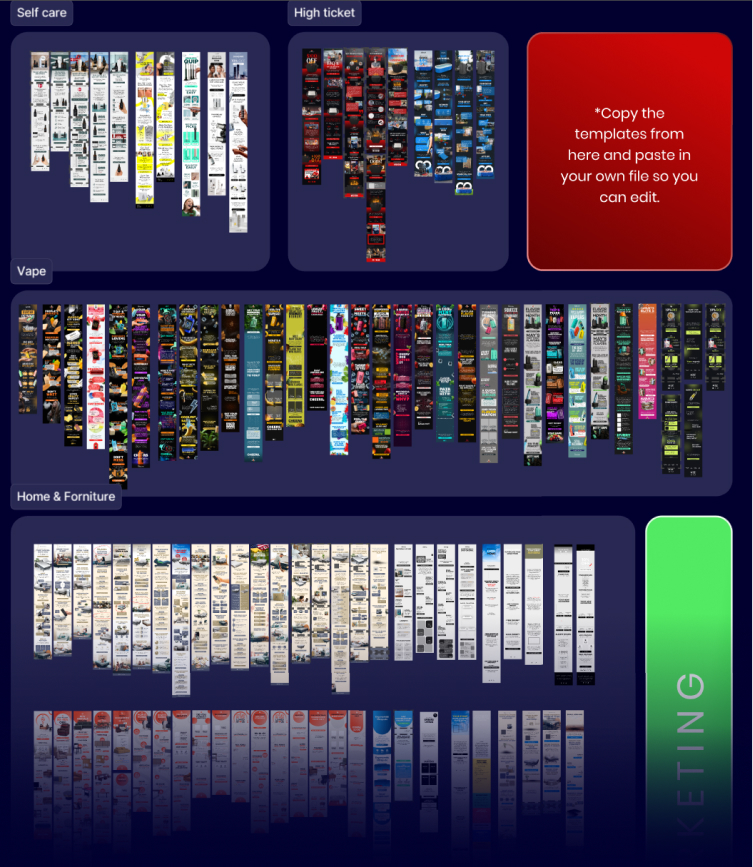
Get Your Free Figma Email Templates
Speed up your design process with our free Figma email template pack. Use proven layouts for Welcome, Abandoned Cart, and Campaign emails. Grab it here: CLICK HERE.
Want Expert Help? Get a Free Email Audit
If you’d like a pro to review your Shopify email setup and create a 90-day revenue plan, request your Free Email Marketing Audit here: CLICK HERE.